Edit And Re apply A Slide Layout Microsoft Support
Web Newer versions Office 2010 Office 2007 Change an existing layout On the View tab click Slide Master In the thumbnail pane that contains the slide masters and layouts pick the layout that has closest arrangement of placeholders to how you want your slide to look
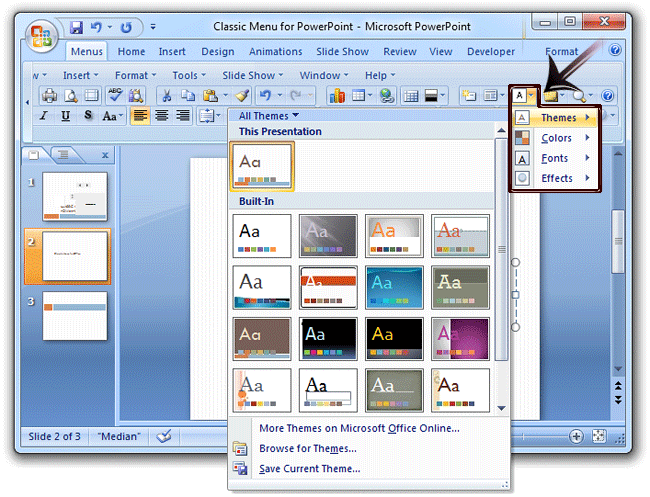
Remove Or Change The Current Theme Microsoft Support, Web To change the theme for your presentation click the Design tab In the Themes group click the theme you want to apply You cannot remove a theme but applying the Office Theme will create the effect of a presention with no theme

Powerpoint 2007 Creating And Setting A Default Template
Web 1 Start PowerPoint and then open or create a master slide to use as your default blank template 2 On the File menu click Save As 3 In the Save as type box click Design Template pot PowerPoint automatically selects the appropriate file location 4 In the File name box type blank pot and then click Save Then try to open powerpoint
Change The Default Template Or Theme In PowerPoint 2007 , Web Apr 3 2014 nbsp 0183 32 Yes And to do that you need to follow any of the two alternative options The first option creates a default template The second option creates a default Theme Choose the one that works for you Templates and Themes Are They Different So are Templates and Themes different Yes they are different but they are similar too
Create And Save A PowerPoint Template Microsoft Support
Create And Save A PowerPoint Template Microsoft Support, Web Click a heading below to open the section and see detailed instructions Create a PowerPoint template Save your presentation as a PowerPoint template potx Apply a template to a new presentation See Also Create your own theme in PowerPoint Save a slide design theme as a template Edit change or delete a placeholder What is a slide
Template For Powerpoint 2007
How To Change Your PowerPoint Template In 60 Seconds
How To Change Your PowerPoint Template In 60 Seconds Web Apr 17 2017 nbsp 0183 32 1 Click on a Thumbnail to Change Your PowerPoint Theme From the themes menu each of these thumbnails represents a different PowerPoint template To change one of these themes you can simply click on one of the thumbnails and you ll see it change in your presentation

Organizational Change Ppt Free Download Blueyellowpinkvans
Web Nov 12 2010 nbsp 0183 32 Learn how to change layouts of slides in PowerPoint 2007 for Windows There are plenty of suitable layouts that you can choose from Author Geetesh Bajaj Product Version PowerPoint 2007 for Windows OS Microsoft Windows XP and higher Date Created November 12 2010 Last Updated July 17 2023 Change Slide Layout In PowerPoint 2007 For Windows Indezine. Web Jun 20 2023 nbsp 0183 32 Step 1 Save Source PowerPoint File as a Template To apply a template to an existing PowerPoint make sure that the template that you wish to switch your design to is saved to your device You can do this via File gt Save as and save the template as a PowerPoint presentation in PPTX format Step 2 Apply the Template to PowerPoint Web First open the presentation whose design you want to use On the File tab click Save As In the dialog box that opens from the Save as type list choose PowerPoint Template Then select Save Now open your existing presentation In the Design tab expand the Themes gallery and click the Browse for Themes option at the bottom

Another Change Ppt Template 2007 you can download
You can find and download another posts related to Change Ppt Template 2007 by clicking link below
- CBeebies Big Fun Time Ending Promo Template 2007 2009 YouTube
- ABC Screenbug Template 2007 09 White Backdrop By Jayctyle On DeviantArt
- Key Ideas Organisational Change Ppt Powerpoint Presentation Pictures
- Reverse Engineering PowerPoint Slide Blue Theme
- Roles In Organizational Change Ppt PowerPoint Presentation Images
Thankyou for visiting and read this post about Change Ppt Template 2007