Edit And Re apply A Slide Layout Microsoft Support
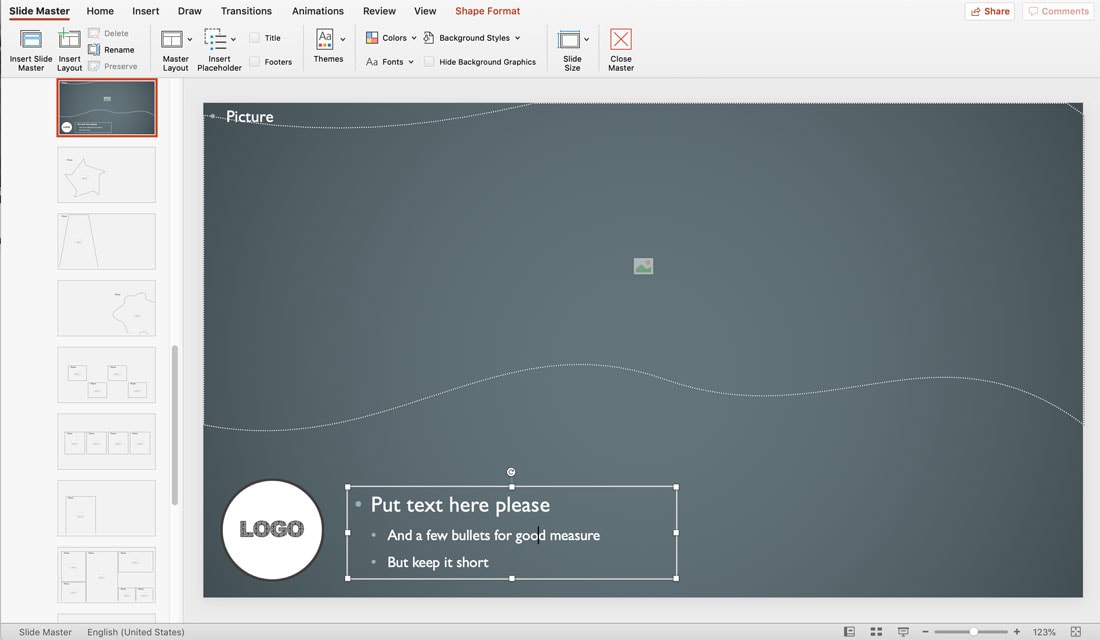
Web Change an existing layout On the View tab click Slide Master In the thumbnail pane that contains the slide masters and layouts pick the layout that has closest arrangement of placeholders to how you want your To change an existing layout do one or more of the following To add a
Apply A Template To An Existing Presentation Microsoft Support, Web Apply the template to existing slides if any Open any docx file in Word Select File gt Options gt Advanced gt File Locations In the File Locations dialog box note the location specified for Workgroup templates If a location name is cut off select it and click Modify to open a dialog box that
How To Edit A PowerPoint Template A Quick Start Guide
Web Apr 29 2022 nbsp 0183 32 How to Edit a PowerPoint Template Step 1 Open the Slide Master and Remove Unnecessary Items Start with the Slide Master navigate to it using View gt Step 2 Add Common Elements to Master Slides While you have the Slide Master open make any changes to slides that you Step 3 Change the
Edit PowerPoint PPT Slide Template Layouts Quickly Video, Web Jan 24 2022 nbsp 0183 32 Click on the Layout drop down and you ll see a variety of thumbnails for the PowerPoint layouts you can use Go to Home gt Layout to start off by selecting a PowerPoint layout for your presentation and add placeholders to your current slide Most PowerPoint themes include a variety of slide layouts

Create And Save A PowerPoint Template Microsoft Support
Create And Save A PowerPoint Template Microsoft Support, Web To create a template you ll need to modify a slide master and a set of slide layouts Choose from thousands of free templates to download at Microsoft templates Newer versions Office 2010 Office 2007 Web Click a heading below to open the section and see detailed instructions Create a PowerPoint template

Download Ppt Undangan Pernikahan Siap Edit Template PPT
How To Edit Or Modify A PowerPoint Template Help Desk Geek
How To Edit Or Modify A PowerPoint Template Help Desk Geek Web Sep 5 2019 nbsp 0183 32 How To Edit Or Modify a PowerPoint Template Edit Or Modify a PowerPoint Template Learning how to edit a presentation is a valuable tool to have in your kit Many Start With The Cover Slide Below is the first slide in a purchased real estate Powerpoint presentation The first thing
Cara Download Template Ppt Di Google KolorPutih
Web Every PowerPoint presentation you create contains a slide master with related slide layouts and a theme You can customize the slide master and the related layouts to make them work with the text and other objects that you want to put on your slides On the View tab click Slide Master In Slide Master view the slide master appears at the top Edit A Slide Master In PowerPoint Microsoft Support. Web Edit a theme Apply a theme to all slides Apply a theme only to selected slides Start a new presentation without a theme Create your own theme Understand the difference between PowerPoint templates and themes Need more help Web Select View gt Slide Master Make the text color and alignment changes you want If you want to use a predefined theme select that first by clicking Themes on the Slide Master tab Then proceed with selecting Colors Fonts Effects and Background Styles When you re done select Close Master View See Also

Another Edit A Template In Ppt you can download
You can find and download another posts related to Edit A Template In Ppt by clicking link below
- Download Ppt Undangan Pernikahan Siap Edit Template PPT
- Download Ppt Undangan Pernikahan Siap Edit Template PPT
- CARA DOWNLOAD TEMPLATE DAN BACKGROUND PPT CARA EDIT YouTube
- Free Template Power Point Design Full Edit And Full Color Template
- Free Template Power Point Design Full Edit And Full Color Template
Thankyou for visiting and read this post about Edit A Template In Ppt