Powerpoint d 233 sactiver Le quot clic Pour Suivant R 233 solu
Mar 3 2007 nbsp 0183 32 A Salut Moi aussi j aimerai savoir comment d 233 sactiver le clic sur un powerpoint En attendant voici la technique que j utilise pour contourner ce probl 232 me Sur chaque diapo j ins 232 re un bouton que j agrandit pour qu il recouvre toute la diapo Dans les options du bouton clic droit je coche l option quot transparence quot
PowerPoint Can t Indent Bullets In Text Box Microsoft Q amp A, Sep 15 2021 nbsp 0183 32 Hi Microsoft Community I have a PowerPoint question here When I go to create a new text box and I apply bullets I m not able to indent the bullet into a secondary bullet I m finding myself having to copy and paste an instance of a multi bulleted

Word Excel PowerPoint Visio
Word Excel PowerPoint Visio Project Office2019 Word Excel PowerPoint Visio Project
PPT , 2 PPT PPT PowerPoint

PPT
PPT , 2 2 2 PowerPoint 3 1
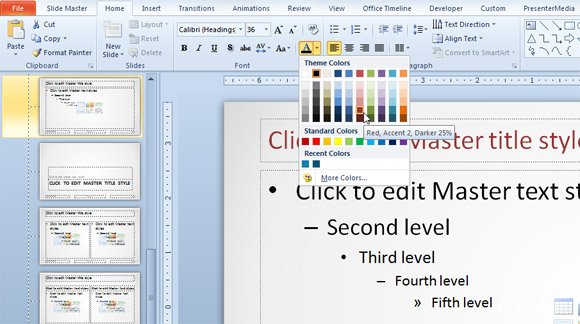
How To Change Default Font Color In A PowerPoint Presentation Template
ppt
ppt PPT PowerPoint 64

Change The Font Theme For The Presentation To Corbel News City Wisdom
ThreeD PPT PowerPoint 3D 3D PPT 3D PowerPoint . Microsoft Office 1 offcie Access Excel PowerPoint Word gt gt 2 PPT PPT

Another Powerpoint Change Presentation Font you can download
You can find and download another posts related to Powerpoint Change Presentation Font by clicking link below
- Choosing The Right PowerPoint Font For Your Presentation
- Best Font To Use For A Powerpoint Presentation Rewasummer
- Create Custom Font Theme In Powerpoint For Mac Nsablitz
- Memilih Font Terbaik Untuk PowerPoint 10 Tips Contoh Desainae
- All About Presentations By Jazz Factory Super Tip Change Fonts On
Thankyou for visiting and read this post about Powerpoint Change Presentation Font