How To Resize PowerPoint Templates How To Geek
Web Mar 29 2019 nbsp 0183 32 Quick Links Resizing PowerPoint Templates By default PowerPoint slides use a widescreen format in a 16 9 ratio If you d like to change it to the standard format 4 3 ratio or even create a custom size PowerPoint provides a quick and painless way to make this happen Resizing PowerPoint Templates
Change The Size Of Your Slides Microsoft Support, Web Select the Design tab of the toolbar ribbon Select Slide Size near the far right end of the toolbar Select Standard 4 3 aspect ratio or Widescreen 16 9 or Custom Slide Size For more about the predefined sizes including formats like Overhead A3 A4 Banner B4 and B5 or your own custom sizing click a heading below to expand it and

Presentation Sizes Canva s Design Wiki Size Guide Canva s
Web 16 9 Commonly known as widescreen 16 9 is used for highly visual content and should be your default choice of size for creating presentations This is because almost all modern projector screens televisions and computers display come in widescreen as a 16 9 layout
Reduce The File Size Of Your PowerPoint Presentations, Web To minimize the file increase embed only those characters used in the presentation Go to File gt Options gt Save Under Preserve fidelity when sharing this presentation select Embed fonts in the file and then select Embed only the characters used in the presentation
Create And Save A PowerPoint Template Microsoft Support
Create And Save A PowerPoint Template Microsoft Support, Web When you create a presentation and then save it as a PowerPoint template potx file you can share it with your colleagues and reuse it again To create a template you ll need to modify a slide master and a set of slide layouts Choose from thousands of free templates to download at Microsoft templates Newer versions Office 2010 Office 2007
View Size Of A Powerpoint Slide Gemsbetta
PowerPoint Design Templates Microsoft Create
PowerPoint Design Templates Microsoft Create Web You can get PowerPoint templates that have modern designs animated ones or even hand drawn art in each slide The color schemes range from bold to subtle Each template s slides are also organized based on what you may want to include in your presentation

Create Any Size Power Point Presentation By Yukishoko Fiverr
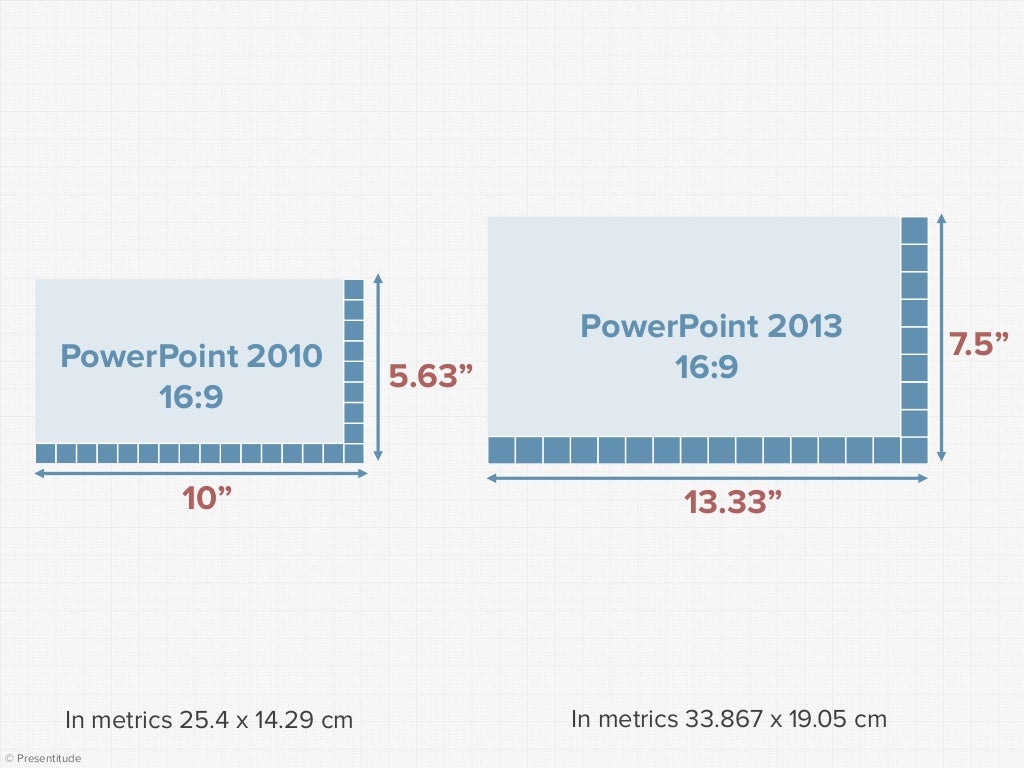
Web Mar 17 2014 nbsp 0183 32 I recommend starting by setting the dimensions to the default PowerPoint size of 10 x 7 5 inches or 720 x 540px a 4 3 aspect ratio Additionally you should determine whether or not your client is also going to need a 16 9 template the other standard aspect ratio for PowerPoint How To Create A Custom PowerPoint Template Design 99designs. Web The classic resolution for computer screens and also used as default for PowerPoint templates are 800 215 600 1024 215 768 1152 215 864 and 1280 215 960 PowerPoint template size for HDTV However nowadays it is becoming most popular the wide horizontal layout in particular when using PowerPoint templates or projection on HDTV Web Choose an appealing consistent template or theme that is not too eye catching You don t want the background or design to detract from your message See Combining colors in PowerPoint Mistakes to avoid For information about using themes see Add color and design to my slides with themes

Another Size For Power Point Template you can download
You can find and download another posts related to Size For Power Point Template by clicking link below
- Create Any Size Power Point Presentation By Yukishoko Fiverr
- Social Media Cheat Sheet Social Media Guide Social Media Planning
- Portraits Template For PowerPoint And Google Slides PresentationGO
- 40 Download Packaging Mockup Ai Psd 1310mockup
- How To Change The Slide Size In PowerPoint For Better Presentations
Thankyou for visiting and read this post about Size For Power Point Template