Change The Size Of Your Slides Microsoft Support Support microsoft
Web Select the Design tab of the toolbar ribbon Select Slide Size near the far right end of the toolbar Select Standard 4 3 aspect ratio or Widescreen 16 9 or Custom Slide Size For more about the predefined sizes including formats like Overhead A3 A4 Banner B4 and B5 or your own custom sizing click a heading below to expand it and
Presentation Sizes Canva, Web With recent advances in technology that is seeing widescreen devices becoming the norm 16 9 is now considered the standard size for on screen presentations over 4 3 Get started with professionally designed presentation templates

How To Resize PowerPoint Templates How To Geek
Web Mar 29 2019 nbsp 0183 32 Resizing PowerPoint Templates By default PowerPoint slides use a widescreen format in a 16 9 ratio If you d like to change it to the standard format 4 3 ratio or even create a custom size PowerPoint provides
PowerPoint Presentation Guidelines McGill University, Web This is a good title size Verdana 40 point A good subtitle or bullet point size Verdana 32 point Content text should be no smaller than Verdana 24 point This font size is not recommended for content Verdana 12 point Font Size The larger the better Remember your slides must be readable even at the back of the room

Create And Save A PowerPoint Template Support microsoft
Create And Save A PowerPoint Template Support microsoft, Web To set the page orientation for all of the slides in your presentation click Slide Size gt Custom Slide Size Under Orientation choose Portrait or Landscape Save your presentation as a PowerPoint template potx

Charles Schwab STANDARD PPT 2010 Template
What Size Should My Slides Be 16 9 Or 4 3 Laura M Foley Design
What Size Should My Slides Be 16 9 Or 4 3 Laura M Foley Design Web Jul 3 2017 nbsp 0183 32 The 16 9 format gives you a lot of slide real estate to play around with The legacy 4 3 aspect ratio while still used creates smaller slides and doesn t look that great on newer screens How do you change an old 4 3 deck to the new 16 9 format Oh this is super fun to do and you re a lucky duck if it becomes your job Not

View Size Of A Powerpoint Slide Gemsbetta
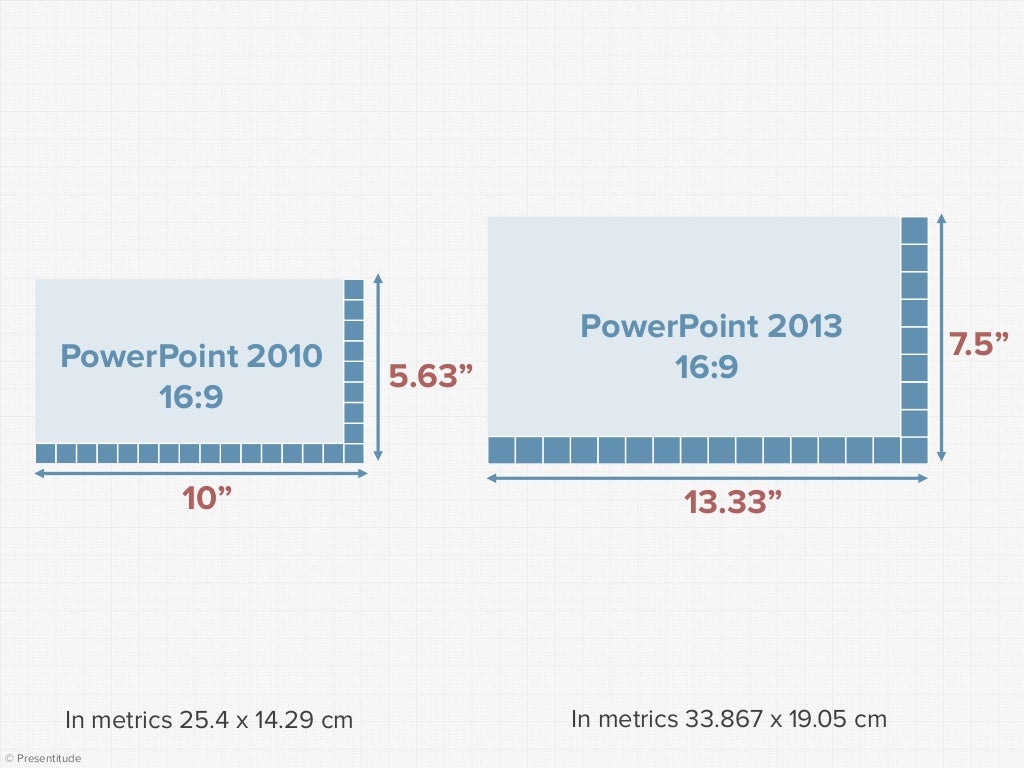
Web Mar 17 2014 nbsp 0183 32 I recommend starting by setting the dimensions to the default PowerPoint size of 10 x 7 5 inches or 720 x 540px a 4 3 aspect ratio Additionally you should determine whether or not your client is also going to need a 16 9 template the other standard aspect ratio for PowerPoint How To Create A Custom PowerPoint Template Design 99designs. Web Organization templates are an easy way to align your presentations to your organization s brand They re simple to use Just go to your organization s templates folder on PowerPoint for Windows Mac or web and select the template you want Your organization must have an Microsoft 365 E3 or E5 plan to use this feature Web Bring your next presentation to life with customizable PowerPoint design templates Whether you re wowing with stats via charts and graphs or putting your latest and greatest ideas on display you ll find a PowerPoint presentation template to make your ideas pop Create from scratch
Another Standard Ppt Template Size you can download
You can find and download another posts related to Standard Ppt Template Size by clicking link below
- Ppt Template Packsver
- Blue Powerpoint Background HD Photo 06715 Baltana
- How To Use Standard Operating Procedures In Construction Riset
- Sop Template Ubicaciondepersonas cdmx gob mx
- UTMB Presentation Templates
Thankyou for visiting and read this post about Standard Ppt Template Size