Chrome Switch Camera Option Google Chrome Community
Mar 10 2019 nbsp 0183 32 Chrome doesn t offer camera switch option for sites Unlike Firefox even going to site settings and changing default
Microsoft Community, Microsoft Community

Microsoft Community
Microsoft Community
Back Up Photos amp Videos Android Google Photos Help, Check your backup for this account To switch Google Accounts at the top right tap your Profile picture or Initial Review your

Use Multiple Cameras With Meet Hardware Google Help
Use Multiple Cameras With Meet Hardware Google Help, Set your default camera in the Google Admin console For steps see Set a default peripheral Switch cameras On the touchscreen
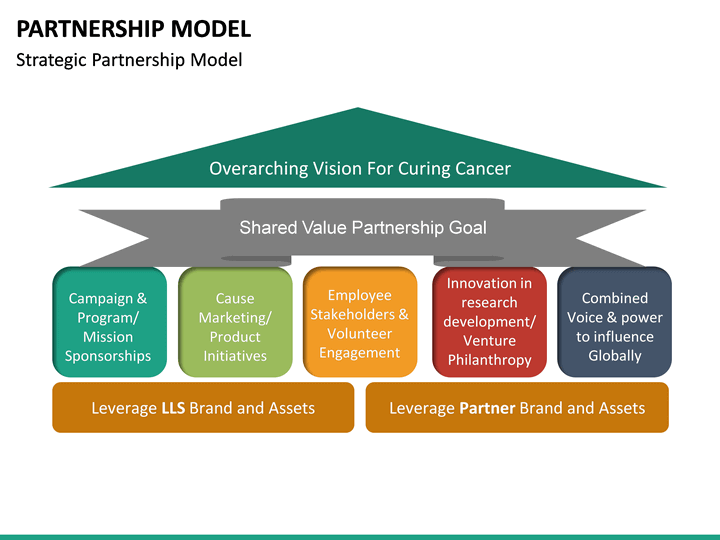
Partner Engagement Model Ppt
My Camera Is Stuck On Selfie Mode And There Is No Flip Button Showing
My Camera Is Stuck On Selfie Mode And There Is No Flip Button Showing Jul 21 2023 nbsp 0183 32 Camera is stuck unselfie mode I can t get it to flip to camera there s no flip button I have tried rebooting I ve reset it I ve

Partner Engagement Model Ppt
Official Google Account Help Center where you can find tips and tutorials on using Google Account and other answers to frequently Google Account Help. On your computer open Chrome At the top right select More Help About Google Chrome Select Relaunch If you can t find the Official Android Messages Help Center where you can find tips and tutorials on using Android Messages and other answers to

Another Partner Engagement Model Ppt you can download
You can find and download another posts related to Partner Engagement Model Ppt by clicking link below
- Partner Engagement PowerPoint Template PPT Slides
- Engagement Model Powerpoint Template Vrogue co
- Partner Engagement PowerPoint Template PPT Slides
- Free Ppt Icons Losagrupo
- Partner Engagement Model Ppt
Thankyou for visiting and read this post about Partner Engagement Model Ppt